Showing posts with label Active Directory. Show all posts

Wednesday, July 8, 2015

Join RHEL/CentOS to Active Directory Domain 2012 R2

Joining a Linux Server to a windows domain is one of the more advanced tasks in Linux administration, however can be accomplished with the help of a few simple tools.

Login as root

Install the per-requisites using following command,

yum -y install nscd.x86_64 pam_krb5.x86_64 samba-winbind.x86_64


Once installed, open authconfig-tui util


Configure exactly as shown on the screen


Now part 2 (customize for your domain)


Make sure it’s not set to /sbin/nologin otherwise domain users will not have shell access

Save the config
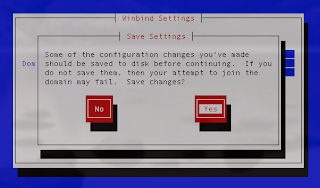


Now enter your windows domain administrator password (only works with administrator)


Joined the domain successfully

Now from here reboot

you should notice a object in Active Directory Users & Computers

to login as a domain user use the following DOMAIN/username

Sunday, October 19, 2014

Windows server 2008 / 2008 R2 AD Time Sync with External NTP Server

As AD servers provide time to machines in a domain it is important to have AD servers synchronized with an reliable time source.

On AD server, you should run command prompt with administrative rights (right click / run as administrator).

First check difference between your server and external time source (in my example 192.168.0.1)

w32tm /stripchart /computer:192.168.0.1 /samples:5 /dataonly

Example:
 

C:\>w32tm /stripchart /computer:192.168.0.1 /samples:5 /dataonly
Tracking 192.168.0.1 [192.168.0.1:123].
Collecting 5 samples.
The current time is 20/10/2014 7:50:58 AM.
07:50:58, +00.1643852s
07:51:00, +00.1643980s
07:51:02, +00.1644108s
07:51:04, +00.1644236s
07:51:06, +00.1801061s

Confiure your server to use external NTP time source for sync:
 

w32tm /config /manualpeerlist:192.168.0.1,0×8, /syncfromflags:manual /update

Example:
 

C:\>w32tm /config /manualpeerlist:192.168.0.1,0×8, /syncfromflags:manual /update

The command completed successfully.

Force sync immediately:


w32tm /resync

Now retry the first command to see the results:


Example:

C:\>w32tm /stripchart /computer:si.pool.ntp.org /samples:5 /dataonly
Tracking 192.168.0.1 [192.168.0.1:123].
Collecting 5 samples.
The current time is 20/10/2014 7:51:50 AM.
07:51:50, +00.1803420s
07:51:52, +00.1647293s
07:51:54, +00.1647421s
07:51:56, +00.1647549s
07:51:58, +00.1647677s